
Real-Time Bill Pay with Auto-Pay for Guaranteed Good Funds, Integrated into QuickBooks® QBO
Auto-Pay with Real-Time Settlement and Instant QBO Reconciliation
To empower businesses with
automated, real-time bill payment systems that guarantee
settlement certainty through FedNow® and RTP®, with
hosted RfP™ delivery and full integration into
QuickBooks® QBO.
TodayPayments.com delivers
next-generation Real-Time Bill Pay solutions, combining
the speed and finality of RTP® and FedNow® with the
convenience of Auto-Pay, ISO 20022 batching, and secure
hosted payment pages. Integrated with QuickBooks® QBO,
our platform simplifies cash flow, reconciliation, and
billing cycles for modern businesses.
Auto-Pay Real-Time Bill Pay—Now
with Guaranteed Good Funds and QBO Sync
In today’s on-demand economy,
businesses need automated bill pay solutions that
don’t just move fast—they provide certainty,
settlement, and real-time reconciliation. That’s
exactly what you get with Real-Time Bill Pay using
Auto-Pay, powered by FedNow® and RTP® and
fully integrated into QuickBooks® QBO.
By sending hosted Request for
Payment (RfP™) links, enabling Auto-Pay enrollment,
and processing payments over real-time rails, merchants
and service providers can receive Good Funds
instantly—eliminating the risk of returns, delays,
or chargebacks.
TodayPayments.com enables
merchants to schedule Auto-Pay real-time transactions
using Request for Payment (RfP™) via FedNow® and
RTP®. Funds are settled instantly, with no
reversals—providing Guaranteed Good Funds
directly into the merchant’s account, with every
transaction recorded in QuickBooks® QBO.
Using ISO 20022 file formats,
businesses can upload structured batch payment files in
XML, JSON, or Excel, automating recurring Auto-Pay
billing with full control and transparency.
See
the features
QuickBooks® ACH, Cards, FedNow and Real-Time Payments
- Payment processing for all QuickBooks desktop, Pro, Premier, Enterprise and also QBO QuickBooks Online Our software is designed for simplicity and ease-of-use.
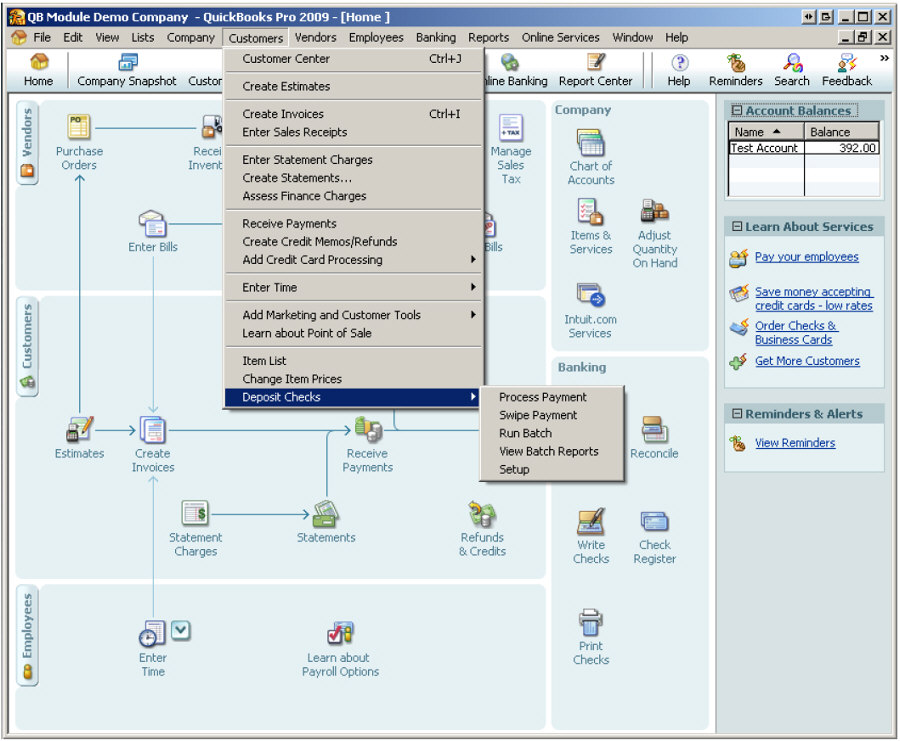
- ~ Automate Account Receivable Collection
- ~ Automate Account Payable Payments
- ~ One-time and Recurring Debits / Credits
Secure QB Plugin payment processing through QuickBooks ® specializes in the origination of moving money electronically.
RTP® Parameters, Attributes, Benefits, and Features
Real-Time Payment System Parameters
|
Attribute |
Description |
|
Payment Rails |
FedNow®, RTP® |
|
Settlement Time |
Real-Time (sub-10 seconds) |
|
Funds Type |
Irrevocable Good Funds |
|
Billing Type |
One-time or Recurring via Auto-Pay |
|
Batch Uploads |
ISO 20022: .XML, .JSON, Excel |
|
Integration |
QuickBooks® QBO (AR Sync) |
|
RfP™ Delivery |
SMS, Email, Texting, Embedded Links |
|
Availability |
24/7/365 |
|
Security |
Hosted, Branded, Mobile-Optimized Pages |
Features
1. Auto-Pay Enrollment with Hosted RfP™
Customers can opt into Auto-Pay through branded RfP™
links, scheduling recurring payments that settle in real time using RTP® or
FedNow®—eliminating late fees, bounced checks, or manual invoices.
2. Guaranteed Good Funds—No Chargebacks
Every payment received is final and irrevocable, giving
businesses the confidence of certain settlement with no risk of reversal or
fraud dispute.
3. QuickBooks® QBO Integration for Instant
Reconciliation
Payments are automatically synced into your AR ledger
in QuickBooks® QBO, eliminating manual entry and streamlining monthly close
processes.
4. Batch Payment Support Using ISO 20022
Businesses can batch upload recurring or one-time
payment instructions using structured formats compatible across U.S. banks
and credit unions.
5. Alias-Based MID Assignment
Assign MID codes by location, employee, or department
using email or mobile identifiers—improving reconciliation and reporting
granularity.
6. Hosted Payment Pages Accessible on Any Device
Every RfP™ includes a secure, mobile-optimized payment
page that simplifies Auto-Pay enrollment and transaction confirmation for
customers.
7. Real-Time Fund Tracking and Notifications
Receive real-time updates when payments settle, with
full visibility across dashboards and audit trails—ideal for finance teams
and compliance.
Ask us How:
- Real-Time Bill Pay using Auto-Pay powered by
FedNow® and RTP® gives merchants the ability to receive certain Good
Funds instantly, 24/7, with real-time syncing to QuickBooks® QBO.
- Batch uploading recurring payment instructions
using ISO 20022 XML, JSON, or Excel enables businesses to automate
high-volume Auto-Pay programs.
- With hosted RfP™ links and branded checkout
pages, customers can securely authorize Auto-Pay transactions from
mobile, email, or digital invoice.
- Unlike traditional ACH or credit cards,
real-time payments settle instantly with finality, reducing cash flow
gaps and eliminating chargebacks.
- TodayPayments.com integrates deeply with QBO to
provide automatic reconciliation, transaction tracking, and AR reporting
with no manual processes.
Why Businesses Choose TodayPayments.com for
Real-Time Auto-Pay
- ✅ Enable hosted RfPs with Auto-Pay
for recurring billing
- ✅ Settle transactions instantly using
RTP® or FedNow® rails
- ✅ Upload batch payments in ISO 20022
format
- ✅ Reconcile automatically with
QuickBooks® QBO
- ✅ Eliminate chargebacks with
irrevocable Good Funds
- ✅ Assign alias-based MIDs for clean
reporting
- ✅ Accept payments 24/7—even on
weekends and holidays
- ✅ Launch in minutes with fully remote
onboarding
To set up Real-Time Bill Pay using either a Bank Bill-pay dashboard or a Biller payment page, with merchants enrolling in FedNow Service through SecureQBPlugin.com using QuickBooks Online (QBO) and QuickBooks Enterprise, follow these detailed steps:
Steps for Real-Time Bill Pay Integration
1. Merchant Enrollment in FedNow Service
- Register with SecureQBPlugin.com:
- Merchants need to sign up on SecureQBPlugin.com and enroll in their FedNow Service.
- Complete any necessary KYC (Know Your Customer) and compliance processes.
- Configure FedNow Integration:
- Set up the FedNow Service within the SecureQBPlugin.com dashboard.
- Ensure that the merchant's bank account is linked and ready to receive real-time payments.
2. Setting Up Real-Time Bill Pay
Via Bank Bill-Pay Dashboard:
- Enable Bill-Pay Option:
- Merchants need to ensure that their biller details are registered with the customer's bank's Bill-pay service.
- This often involves working with the bank to ensure that biller details are correctly listed and accessible to customers.
- Customer Authorization:
- Customers can add the merchant as a payee in their bank's Bill-pay dashboard.
- Once set up, they can schedule real-time payments through the FedNow network.
On Biller Payment Page:
- Integrate Payment Page:
- Embed the SecureQBPlugin.com payment widget or API on the merchant's payment page.
- This widget should allow customers to enter payment details and authorize real-time payments via FedNow.
- Real-Time Payment Execution:
- Once a customer authorizes a payment, SecureQBPlugin.com will process the transaction through FedNow, providing instant confirmation to both the customer and the merchant.
3. Ensuring Real-Time Confirmation
- Instant Notifications:
- Configure notifications within SecureQBPlugin.com to alert both the merchant and the customer upon successful payment.
- This can include email, SMS, or in-app notifications.
- Payment Reconciliation:
- Payments received via FedNow should be instantly reflected in the merchant's bank account.
- QuickBooks can be set up to automatically reconcile these payments, ensuring accurate accounting records.
4. Integration with QuickBooks
For QuickBooks Enterprise:
- Enable ACH Payments:
- Navigate to Customers > Create Invoices.
- Enable ACH payment options.
- Configure the payment method with SecureQBPlugin.com for Real-Time ACH, FedNow, and RTP.
- Set Up Bank Feeds:
- Go to Banking > Bank Feeds.
- Connect your bank account to receive Real-Time ACH, FedNow, and RTP transactions.
For QuickBooks Online (QBO):
- Enable ACH Payments:
- Go to Sales > Invoices.
- Enable ACH payment options.
- Configure the payment method with SecureQBPlugin.com for Real-Time ACH, FedNow, and RTP.
- Set Up Bank Feeds:
- Go to Banking > Bank Accounts.
- Connect your bank account to receive Real-Time ACH, FedNow, and RTP transactions.
5. Security and Compliance
- Data Encryption:
- Ensure all payment data is encrypted and secure.
- Regulatory Compliance:
- Verify that SecureQBPlugin.com complies with NACHA rules, FedNow, RTP, and any other relevant financial regulations.
6. Customer Support and Communication
- Customer Instructions:
- Provide clear instructions on how customers can set up and use real-time bill pay via their bank's Bill-pay dashboard or the merchant’s payment page.
- Include FAQs and troubleshooting tips on the merchant's website.
- Support Services:
- Offer support channels (email, phone, chat) to assist customers with any issues related to real-time payments.
Example Implementation
- Enroll in FedNow Service:
- Merchant signs up on SecureQBPlugin.com and completes FedNow enrollment.
- Configure Payment Options:
- Set up the merchant's details in the bank's Bill-pay system.
- Integrate the SecureQBPlugin.com payment widget on the merchant’s payment page.
- Enable Real-Time Bill Pay:
- Customers add the merchant as a payee in their bank's Bill-pay dashboard.
- Customers use the payment widget to make real-time payments on the merchant’s site.
- Monitor and Reconcile Payments:
- Use SecureQBPlugin.com dashboard for real-time notifications and payment tracking.
- Automatically reconcile payments in QuickBooks.
- Ensure Security:
- Implement data encryption for all transactions.
- Ensure compliance with financial regulations.
- Support and Communication:
- Provide detailed instructions and support for customers.
- Set up automated notifications for payment confirmations.
By following these steps, merchants can set up Real-Time Bill Pay via either Bank Bill-pay dashboards or on their payment pages, leveraging FedNow Service through SecureQBPlugin.com with QuickBooks Online and QuickBooks Enterprise to provide a seamless and efficient payment experience.
Why wait days to get paid—or risk payment
failure—when your business can collect instantly with certainty?
At
TodayPayments.com,
we help businesses automate Real-Time Bill Pay using Auto-Pay,
hosted RfPs, and Good Funds settlement over FedNow® and RTP®.
With direct QuickBooks® QBO integration, real-time payments are
synced, tracked, and reconciled the moment they happen.
✅ Instant settlement
✅
Batch support with ISO 20022
✅ Hosted payment pages—mobile-ready
✅ No chargebacks, no guesswork
✅ Works
seamlessly with QuickBooks® QBO
👉 Visit
TodayPayments.com
to activate your Real-Time Auto-Pay system today.
Send. Settle.
Sync. Secure. Instantly.
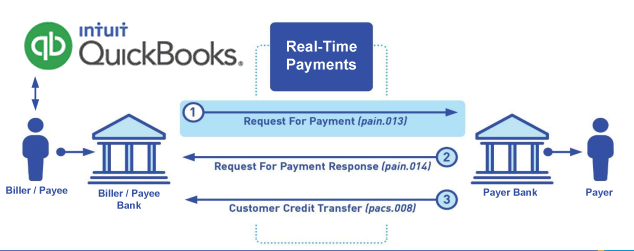
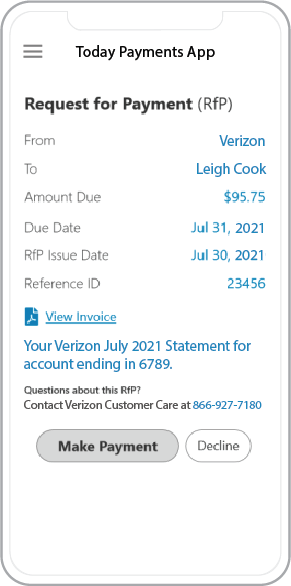 Call us, the .csv, text messaging and or .xml Request for Payment (RfP) file you need while on your 1st phone call! We guarantee our reports work to your Bank and Credit Union. We were years ahead of competitors recognizing the benefits of RequestForPayment.com. We are not a Bank. Our function as a role as an "Accounting System" in Open Banking with Real-Time Payments to work with Billers to create the Request for Payment to upload the Biller's Bank online platform. U.S. Companies need help to learn the RfP message delivering their bank. Today Payments' ISO 20022 Payment Initiation (PAIN .013) show how to implement Create Real-Time Payments Request for Payment File up front delivering message from the Creditor (Payee) to it's bank. Most banks (FIs) will deliver the message Import and Batch files for their company depositors for both FedNow and Real-Time Payments (RtP). Once uploaded correctly, the Creditor's (Payee's) bank continuing through a "Payment Hub", will be the RtP Hub will be The Clearing House, with messaging to the Debtor's (Payer's) bank.
Our in-house QuickBooks payments experts are standing ready to help you make an informed decision to move your company's payment processing forward.
Pricing with our Request For Payment Professionals
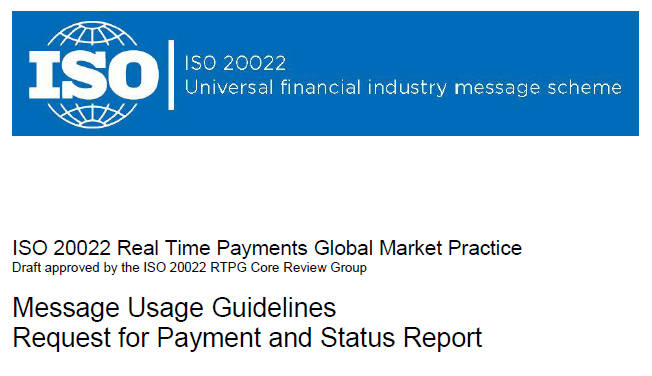
1) Free ISO 20022 Request for Payment File Formats, for FedNow and Real-Time Payments (The Clearing House) .pdf for you manually create "Mandatory" (Mandatory data for completed file) fields, start at page 4, with "yellow" highlighting. $0.0 + No Support
2) We create .csv or .xml formatting using your Bank or Credit Union. Using your invoice information database to create an existing Accounts Receivable file, we CLEAN, FORMAT to FEDNOW or Real-Time Payments into CSV or XML. Create Multiple Templates. You can upload or "key data" into our software for File Creation of "Mandatory" general file. Use either the Routing Number and Account Number for your Customers or use "Alias" name via Mobile Cell Phone and / or Email address.
Fees = $57 monthly, including Activation, Support Fees and Batch Fee, Monthly Fee, User Fee. We add your URI for each separate Payer transaction for additional Payment Methods on "Hosted Payment Page" (Request for file with an HTML link per transaction to "Hosted Payment Page" with ancillary payment methods of FedNow, RTP, ACH, Cards and many more!) + $.03 per Transaction + 1% percentage on gross dollar file,
3) Add integrating QuickBooks Online "QBO" using FedNow Real-time Payment using our Real Time Bill Pay system.
Fees Above 2) plus $29 monthly additional QuickBooks Online "QBO" formatting, and "Hosted Payment Page" and WYSIWYG
4) Above 3) plus Create "Total" (over 600 Mandatory, Conditional & Optional fields of all ISO 20022 Pain .013) Price on quote.
Start using our FedNow Real-Time Payments Bank Reconciliation:
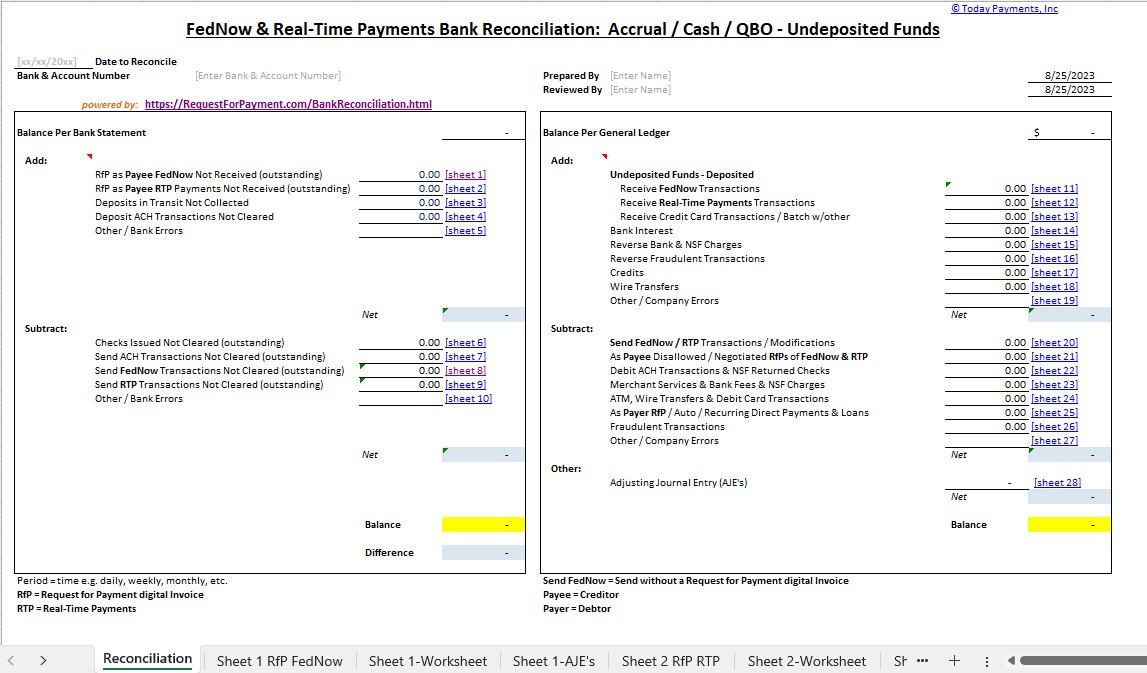
Dynamic integrated with FedNow & Real-Time Payments (RtP) Bank Reconciliation: Accrual / Cash / QBO - Undeposited Funds
Give Us A Call
(866) 927-7180